WIFT calculates production-ready venue capacity in under 30 seconds — accounting for stage, screens, AV, rigging, and code-compliant aisles. No training required.
This is a 1,768 sq ft room. The hotel says it holds 72. WIFT — accounting for stage, screens, FOH position, and code-compliant aisles — calculates 36. That gap is where cost cascades begin.
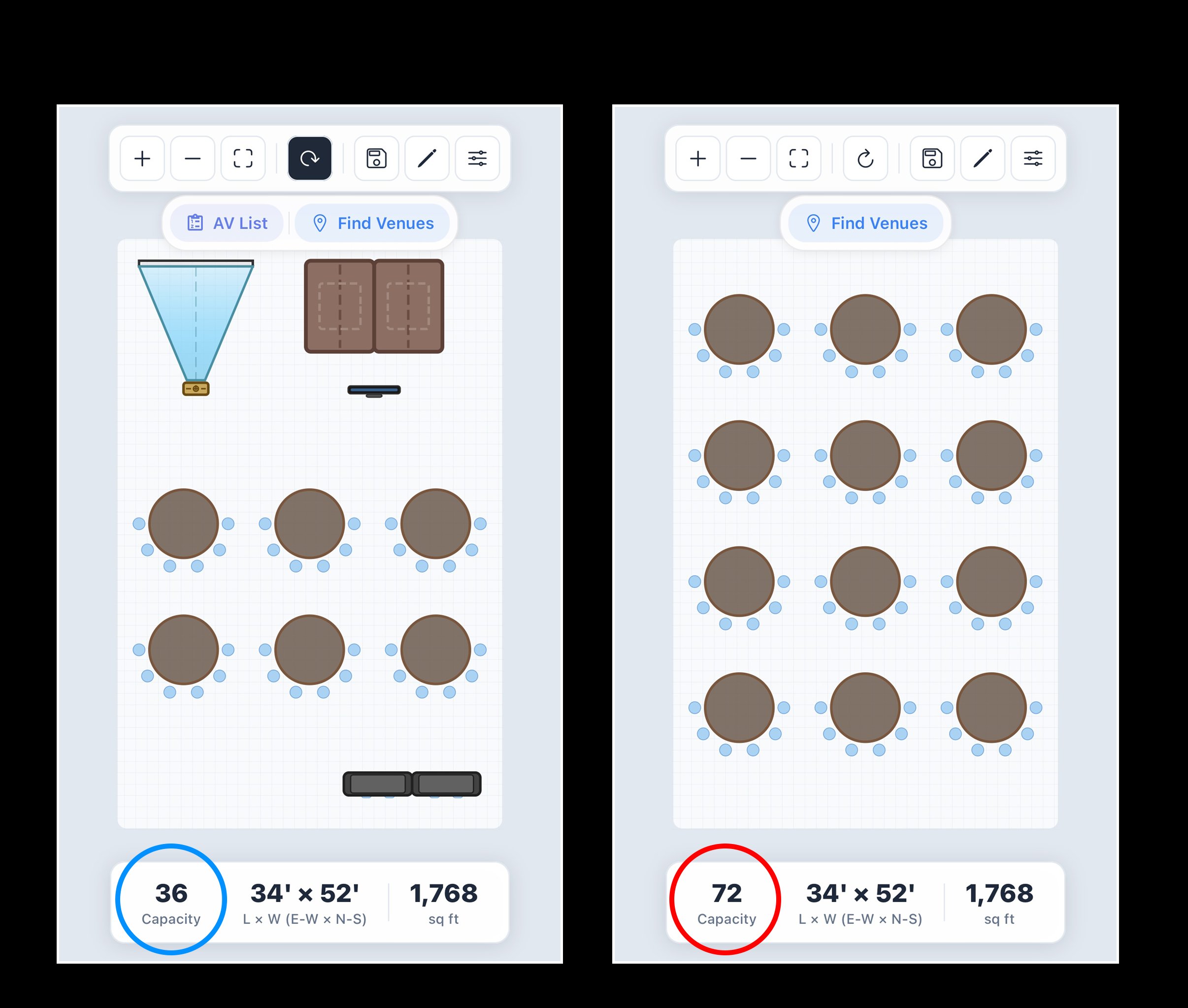
Venue capacity numbers are almost always wrong for production events. WIFT exists because we've lived that problem — and built the tool we wished we had.
A room that holds 500 for a reception holds 280 once you add a stage, LED wall, rigging, and production footprint. WIFT calculates the real number in seconds.
You're standing in the room with a client and a sales manager. You need a confident answer right now — not in 45 minutes when you've sketched it out by hand.
A room confirmed on bad capacity data means venue changes, re-quoting AV, revised contracts, and a client who blames you. An expensive mistake to fix — and an avoidable one.
No learning curve. No training required. Just the answer you need to confirm a venue or move a deal forward — in 30 seconds.
Input the room's square footage and dimensions. Works on mobile — right from a site visit. No CAD skills, no learning curve.
Tell WIFT what your event needs: stage size, LED wall, rigging grid, FOH position, breakout areas. It factors all of it into the calculation.
WIFT tells you exactly what fits — and what doesn't — before you sign anything. Production-accurate capacity with a to-scale floor plan in under 30 seconds.
Cvent Event Diagramming renders your room. Vectorworks drafts it. WIFT validates whether your production physically fits — with no training and results in 30 seconds.
| Feature | ✦ WIFT | Cvent Event Diagramming | Vectorworks | Manual Process |
|---|---|---|---|---|
| Production-accurate capacity | ✓ | — | ✓ With hours of manual work |
— |
| AV & rigging footprint modeling | ✓ | — | ✓ Manual diagramming only |
— |
| Physical feasibility validation | ✓ | — | ✓ Only after full drawing |
— |
| Time required | 30 seconds | 30–60 min to diagram |
Hours of CAD work |
Hours per venue |
| Results in under 30 seconds | ✓ | — | — | — |
| No training required | ✓ | — | — | ✓ |
| Works on mobile (site visits) | ✓ | — | — | ✓ |
| Floor plan rendering | ✓ | ✓ | ✓ | — |
| Starting price | $59.99/mo | $199+/mo | $800+/yr | Free (your time) |
No enterprise contracts. No seat limits. Full access on both plans.
Applied at checkout on the annual plan.
Your first 7 days are free. No credit card. The room either works — or it doesn't. WIFT tells you which before you sign.